
Guest Login gives a player a simple, reusable session without requiring a username, password, or first-party platform account. Use it when you want players into your game as quickly as possible, or during development before you've settled on a target platform.
Prerequisites
Register a Session
Start a Guest Login session to register the player and receive a session token.
Create a new empty GameObject in your scene named GameManager (skip this if you already have one), then add a new script to it called GameManager.
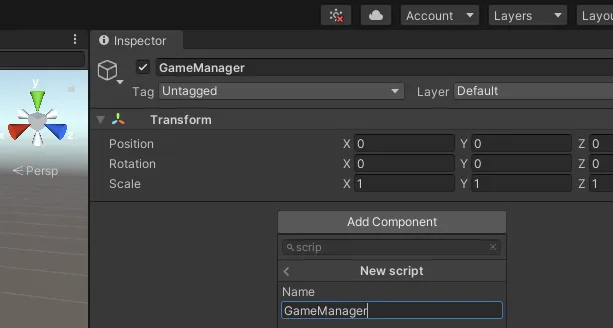
Open up your new script in your editor of choice and add the following code:
using System.Collections;using System.Collections.Generic;using UnityEngine;using LootLocker.Requests;
public class GameManager : MonoBehaviour{    void Start()    {        LootLockerSDKManager.StartGuestSession((response) =>        {            if (!response.success)            {                Debug.Log("error starting LootLocker session");
                return;            }
            Debug.Log("successfully started LootLocker session");        });    }}
Run your game and check the console for the success message to confirm the session started correctly.
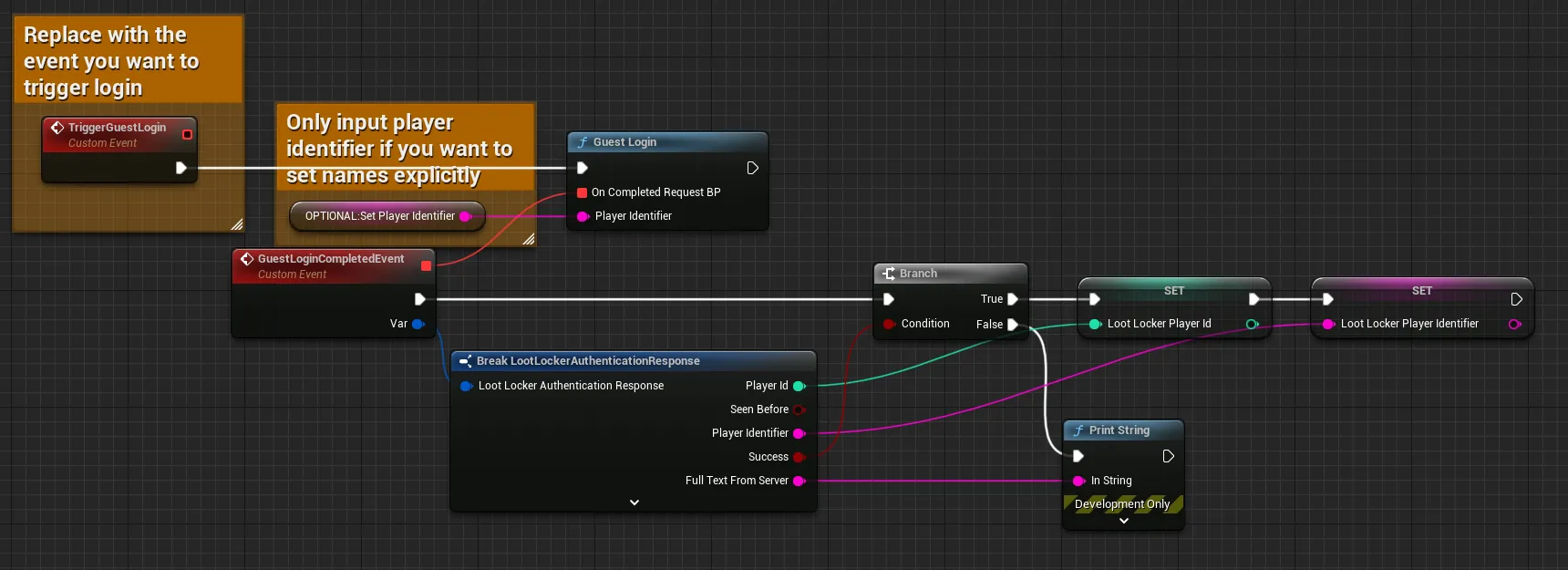
Input
Exchange the TriggerGuestLogin event for whatever event should trigger the login flow. For Guest Login without a specific identifier, trigger it on BeginPlay.
Remove the "Optional: Set Player Identifier" node. The Guest Login node accepts a Player Identifier input — supply one to log the player in with that identifier. Note that identifiers must be unique per player and aren't tied to any authentication. If you don't supply one, LootLocker generates a unique identifier and remembers it between game starts.
Output
Create variables from the Player ID and Player Identifier outputs for use in subsequent LootLocker calls.
Branch the completed events on the success flag, and add error handling for the failure case.
Open the script from which you want to trigger LootLocker authentication and add the following code:
var guestLoginResponse = await LL_Authentication.GuestSession.new(playerIdentifier).send()if(!guestLoginResponse.success) :  printerr("Guest login failed with reason: " + guestLoginResponse.error_data.to_string())  return
print("Guest user was successfully signed in to LootLocker")
Run your game and check the console for the success message to confirm the session started correctly.
Register a new player:
curl -X POST "https://api.lootlocker.io/game/v2/session/guest" \ -H "Content-Type: application/json" \ -d "{\"game_key\": \"your_game_key\", \"game_version\": \"0.10.0.0\"}"Register an existing player:
curl -X POST "https://api.lootlocker.io/game/v2/session/guest" \ -H "Content-Type: application/json" \ -d "{\"game_key\": \"your_game_key\", \"player_identifier\": \"ec9b35e6-b184-4f34-b49f-980f86b291e2\", \"game_version\": \"0.10.0.0\"}"Example response:
{ "success": true, "session_token": "e6fa44946f077dd9fe67311ab3f188c596df9969", "player_id": 3, "public_uid": "TSEYDXD8", "player_identifier": "ec9b35e6-b184-4f34-b49f-980f86b291e2", "player_created_at": "2022-05-30T07:56:01+00:00", "check_grant_notifications": true, "check_deactivation_notifications": false, "seen_before": true}Conclusion
You've started using LootLocker in your game with Guest Login. Next, review LootLocker's full feature set to decide which other features to implement.