
If you want your White Label users to verify their provided emails, use the following example to request it.
Prerequisites
- Unity, Unreal, or Godot SDK installed and configured in your project (not required for REST).
- Account Verification enabled in Platform Settings.
Request Verification
// Remember to use the LootLocker namespace in the top of your file.using LootLocker.Requests;
// This code should be placed in a handler when the user verifies their email.int userId = 1234;LootLockerSDKManager.WhiteLabelRequestVerification(userId, (response) =>{    if (!response.success)    {        Debug.Log("error requesting account verification");
        return;    }
    Debug.Log("account verification requested successfully");});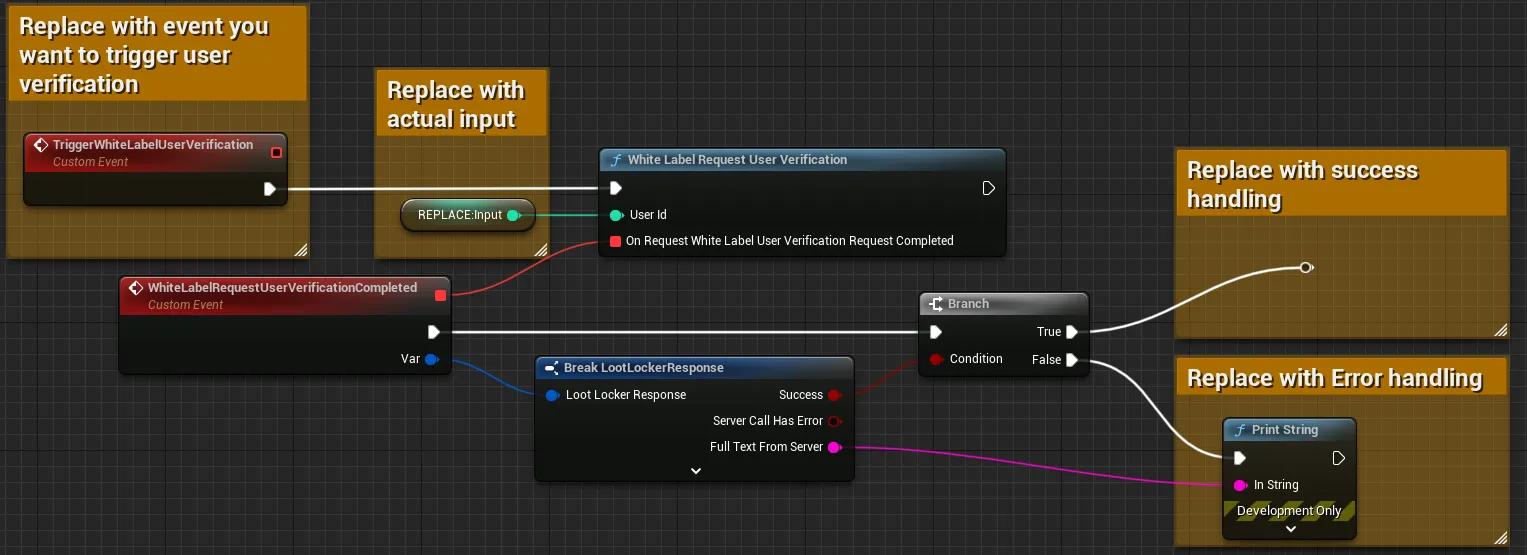
Input
Exchange the TriggerWhiteLabelUserVerification event for whatever event should trigger the login flow. Replace the REPLACE: Input node with the user's ID.
Output
Branch the completed events on the success flag, and add error handling for the failure case.
var response = await LL_WhiteLabel.RequestVerification.new("an-email").send()if(!response.success) : # Request failed, handle errors passelse: # Request succeeded, use response as applicable in your game logic passcurl -X POST "https://api.lootlocker.io/white-label-login/request-verification" \ -H "domain-key: 11aaa11" \ -H "is-development: true" \ -H "Content-Type: application/json" \ -d "{\"user_id\": 406}"This returns a 204 with no body.
Conclusion
You've requested verification for a White Label user. Next, learn how to handle returning users.