
This how-to starts a session with the player's timezone, retrieves the latest broadcast messages, and displays the data in your game.
Prerequisites
- Unity, Unreal, or Godot SDK installed and configured in your project (not required for REST).
- Broadcasts configured in the Web Console.
Start Session with Timezone Support (Optional)
To ensure broadcast messages are filtered and scheduled according to the player's timezone, you can optionally include timezone information when starting a player session.
This example uses Guest Login, but all platforms are supported.
using LootLocker.Requests;using System;
public void StartSessionWithTimezone(){    // Create session optionals to include timezone    LootLockerSessionOptionals optionals = new LootLockerSessionOptionals();
    // For Windows, convert the system timezone to IANA format, read more in the section below    optionals.timezone = LootLockerTimezoneConverter.ConvertWindowsToIanaTzString(TimeZoneInfo.Local.StandardName);
    // Start a guest session with timezone    LootLockerSDKManager.StartGuestSession((response) =>    {        if (response.success)        {            Debug.Log("Session started successfully with timezone: " + optionals.timezone);            // Proceed to retrieve broadcasts        }        else        {            Debug.LogError("Failed to start session: " + response.errorData.message);        }    }, optionals);}
#include "LootLockerSDKManager.h"
void YourClass::StartSessionWithTimezone(){ FLootLockerSessionOptionals optionals { YourClass::GetTimezone() }; ULootLockerSDKManager::GuestLogin(FLootLockerSessionResponse::CreateLambda([](FLootLockerAuthenticationResponse Response) { if (Response.success) { UE_LOG(LogWorkingProject, Display, TEXT("Session started successfully with timezone! Player ULID: %s"), *Response.player_ulid); } else { UE_LOG(LogWorkingProject, Error, TEXT("Failed to start session with timezone: %s"), *Response.ErrorData.Message); } }), "", optionals);}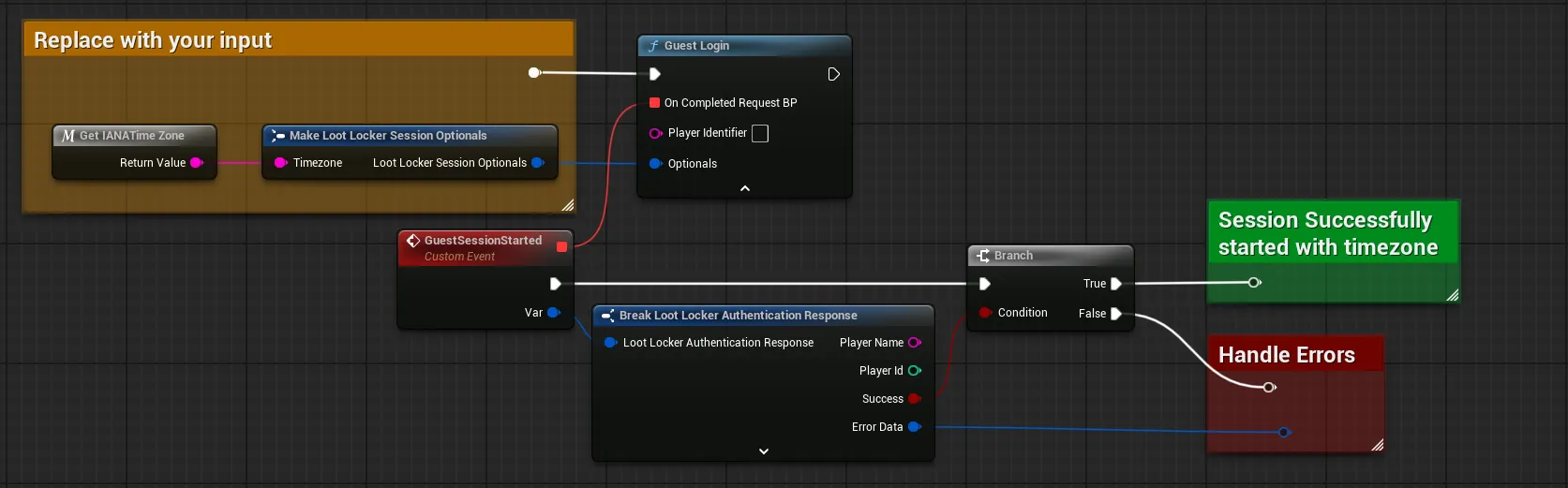
Coming soon — this sample hasn't been written yet.
Coming soon — this sample hasn't been written yet.
About Timezones
LootLocker uses the IANA standard for dealing with timezones. A timezone is written to a player's metadata with the key ll.timezone.
All platforms except Windows use IANA. If your game runs on Windows, you must convert the Windows timezone to an IANA timezone before sending it to LootLocker.
Use the utility class LootLockerTimezoneConverter to convert back and forth between IANA timezones:
// When sending a Windows Timezone to LootLocker: LootLockerTimezoneConverter.TryConvertStringToIanaTzString(TimeZoneInfo.Local.StandardName); // When reading an Iana timezone returned from LootLocker: LootLockerTimezoneConverter.TryConvertStringToWindowsTzString(/*LootLockerIanaTimezoneReturnedFromMetadata*/);Every time you start a LootLocker session, send the IANA timezone for the user. The SDK ships helper functions for this: ULootLockerManager::GetLocalIanaTimezone() returns the OS-reported timezone converted to IANA (including the Windows-to-IANA conversion), and ULootLockerManager::GetCurrentUTCOffsetAsIanaTimezone(int32 UTCOffsetHours) converts a UTC offset to an IANA timezone string:
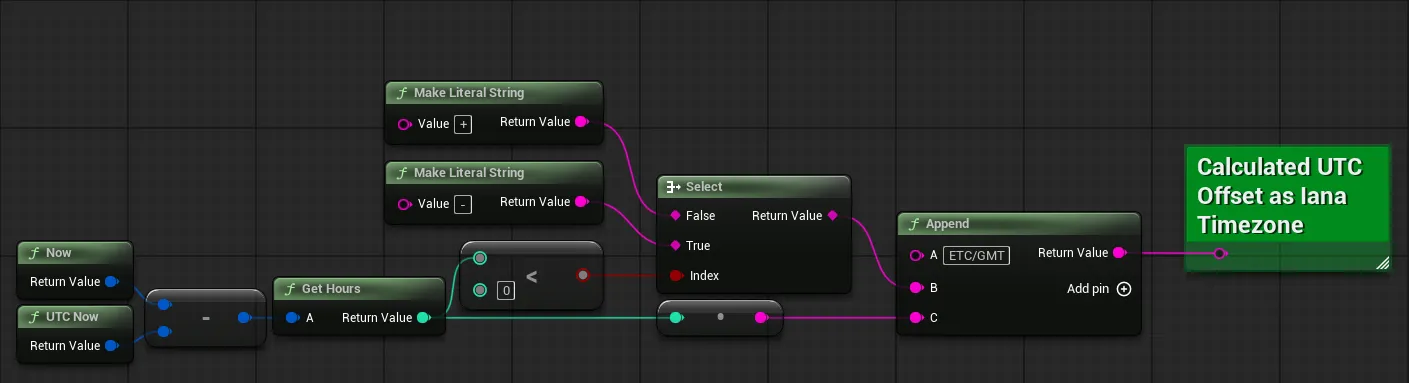
void YourClass::StartSessionWithTimezone(){ FLootLockerSessionOptionals optionals { ULootLockerManager::GetLocalIanaTimezone() }; // ... start the session with the optionals as shown above}If you prefer to calculate the offset from UTC yourself, note that IANA timezone names are case-sensitive (Etc/GMT, not ETC/GMT) and that the Etc/GMT sign convention is inverted: Etc/GMT+5 means UTC-5.
FString YourClass::GetCurrentUTCOffsetAsIanaTimezone(){ FDateTime Now = FDateTime::Now(); FDateTime UTCNow = FDateTime::UtcNow(); FTimespan Offset = Now - UTCNow; int offsetHours = Offset.GetHours(); // IANA inverts the sign for Etc/GMT zones: UTC-5 is "Etc/GMT+5" and UTC+2 is "Etc/GMT-2" FString tz = offsetHours == 0 ? TEXT("Etc/UTC") : FString::Printf(TEXT("Etc/GMT%s%d"), offsetHours < 0 ? TEXT("+") : TEXT("-"), FMath::Abs(offsetHours)); return tz;}You can validate a timezone string with ULootLockerManager::IsValidIanaTimezone(const FString& Timezone) before sending it.
Coming soon — this sample hasn't been written yet.
Coming soon — this sample hasn't been written yet.
Retrieve Broadcast Messages
Once you have an active session, retrieve broadcast messages that are currently live for your game and display them according to the player's preferred language.
using LootLocker.Requests;using System.Collections.Generic;
public void GetBroadcastMessages(){    string[] languagesToRetrieve = new string[] { "en", "sv" }; // English and Swedish    int limit = 10; // Number of items to fetch in this request
    LootLockerSDKManager.ListBroadcasts(languagesToRetrieve, limit, (response) =>    {        if (response.success)        {            Debug.Log($"Retrieved {response.broadcasts.Length} broadcast messages");
            foreach (var broadcast in response.broadcasts)            {                ProcessBroadcast(broadcast);            }        }        else        {            Debug.LogError("Failed to retrieve broadcasts: " + response.errorData.message);        }    });}
// Example function for processing the broadcastprivate void ProcessBroadcast(BroadcastMessage broadcast){    // If you need to treat languages differently, you can check the key of the current language    if (broadcast.languages.ContainsKey("en"))    {        LootLockerBroadcastLanguage currentLanguage = broadcast.languages["en"];        // The headline of the broadcast        Debug.Log($"Headline: {currentLanguage.headline}");        // The body of the broadcast        Debug.Log($"Body: {currentLanguage.body}");        // The language code of the broadcast        Debug.Log($"Language: {currentLanguage.language_code}");        // An URL to an image, add your own logic to download and display images in your UI        Debug.Log($"Image URL: {currentLanguage.image_url}");        // Custom action to take, for example starting a specific animation or instantiate a certain prefab        Debug.Log($"Action: {currentLanguage.action}");        // Process additional logic for extra localization keys, if any        foreach (var extraLocalization in currentLanguage.localizations)        {            Debug.Log($"Additional Localization - Key: {extraLocalization.Key}, Value: {extraLocalization.Value}");        }    }}
#include "LootLockerSDKManager.h"
void YourClass::ListBroadcasts(){ TArray<FString> LanguagesToRetrieve { "en", "sv" }; // English and Swedish int Limit = 10; // Number of items to fetch in this request
ULootLockerSDKManager::ListBroadcasts(LanguagesToRetrieve, Limit, FLootLockerListBroadcastsResponseDelegate::CreateLambda([](const FLootLockerListBroadcastsResponse& Response) { if (Response.success) { for (const FLootLockerBroadcast& broadcast : Response.broadcasts) {
UE_LOG(YOUR_LOG_CATEGORY, Display, TEXT("Broadcast ID: %s"), *broadcast.id); UE_LOG(YOUR_LOG_CATEGORY, Display, TEXT("Broadcast Name: %s"), *broadcast.name); UE_LOG(YOUR_LOG_CATEGORY, Display, TEXT("Game Name: %s"), *broadcast.game_name); UE_LOG(YOUR_LOG_CATEGORY, Display, TEXT("Publication information:")); for(const FLootLockerBroadcastPublicationSetting& publicationSettings : broadcast.publication_settings) { UE_LOG(YOUR_LOG_CATEGORY, Display, TEXT(" Publication Setting ID: %d"), publicationSettings.id); UE_LOG(YOUR_LOG_CATEGORY, Display, TEXT(" Publication start date: %s"), *publicationSettings.start.ToString()); UE_LOG(YOUR_LOG_CATEGORY, Display, TEXT(" Publication end date: %s"), *publicationSettings.end.ToString()); UE_LOG(YOUR_LOG_CATEGORY, Display, TEXT(" Publication timezone: %s"), *publicationSettings.tz); }
// If you need to treat languages differently, you can check the key of the current language if(broadcast.languages.Contains("en")) { const FLootLockerBroadcastLanguage& currentLanguage = broadcast.languages["en"]; UE_LOG(YOUR_LOG_CATEGORY, Display, TEXT("Headline: %s"), *currentLanguage.headline); UE_LOG(YOUR_LOG_CATEGORY, Display, TEXT("Body: %s"), *currentLanguage.body); UE_LOG(YOUR_LOG_CATEGORY, Display, TEXT("Language code: %s"), *currentLanguage.language_code); UE_LOG(YOUR_LOG_CATEGORY, Display, TEXT("Image URL: %s"), *currentLanguage.image_url); UE_LOG(YOUR_LOG_CATEGORY, Display, TEXT("Action: %s"), *currentLanguage.action); for(const auto& extraLocalization : currentLanguage.localizations) { UE_LOG(YOUR_LOG_CATEGORY, Display, TEXT("Additional Localization - Key: %s, Value: %s"), *extraLocalization.Key, *extraLocalization.Value); } } } } else { UE_LOG(YOUR_LOG_CATEGORY, Error, TEXT("ListBroadcasts failed: %s"), *Response.ErrorData.Message); } }));}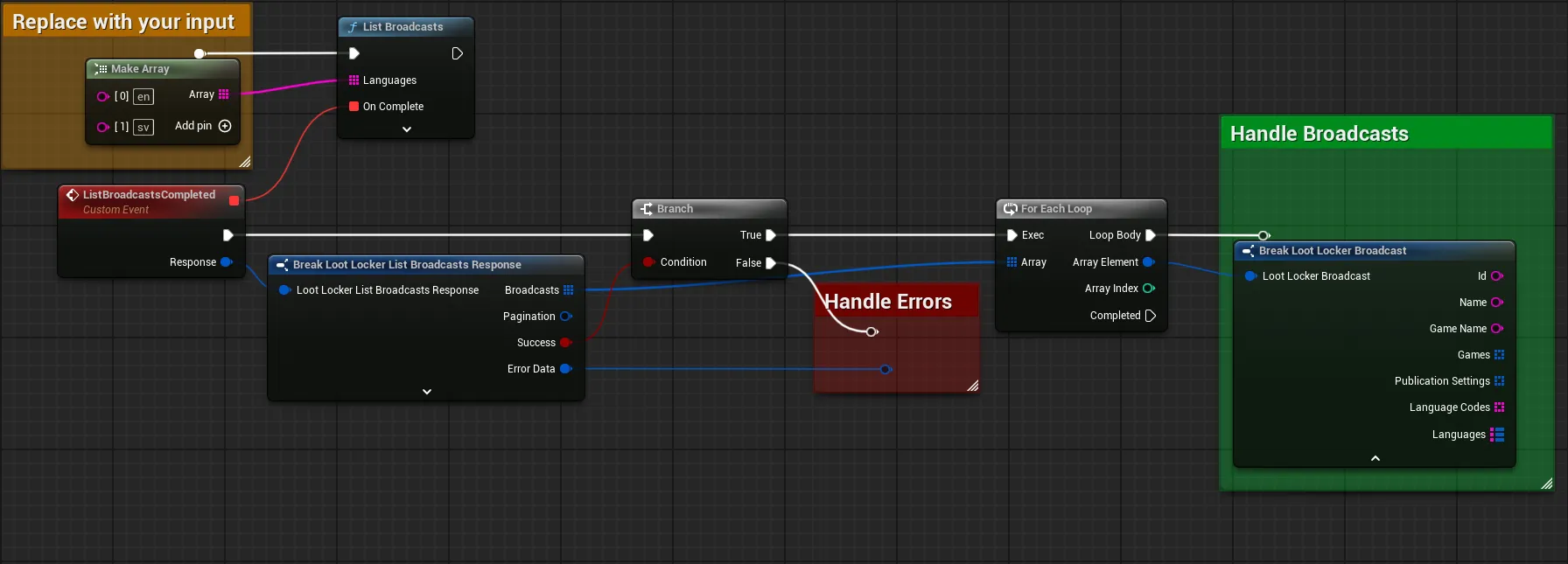
Coming soon — this sample hasn't been written yet.
Coming soon — this sample hasn't been written yet.
Conclusion
You've retrieved broadcast messages from LootLocker and displayed their content in your game. Your game can now retrieve rich, localized broadcast messages that are properly scheduled according to player timezones, with support for multiple languages and custom localized fields like button text, subtitles, and other game-specific content.