
This how-to uses Rich Presence to send player status changes from your game.
Prerequisites
- Unity, Unreal, or Godot SDK installed and configured in your project (not required for REST).
- Rich Presence enabled in the Web Console.
- Presence enabled in the SDK.
Rich Presence
Rich Presence doesn't require any additional setup in the SDK.
Sending Status Changes
When sending a state change for a player, provide:
- A status name, e.g.
main_menu,level_1,settings_menu. - Metadata (optional), e.g.
build_version,game_fps_count.
Sending a Presence status is as simple as calling a function.
// Example code of a function being called when the player enters a Game Over statepublic void SendGameOverPresenceStatus(){ Dictionary<string, string> presenceDetails = new Dictionary<string, string>() { {"device", SystemInfo.deviceModel }, {"unity_version", Application.unityVersion} }; LootLockerPresenceManager.UpdatePresenceStatus("game_over", presenceDetails);}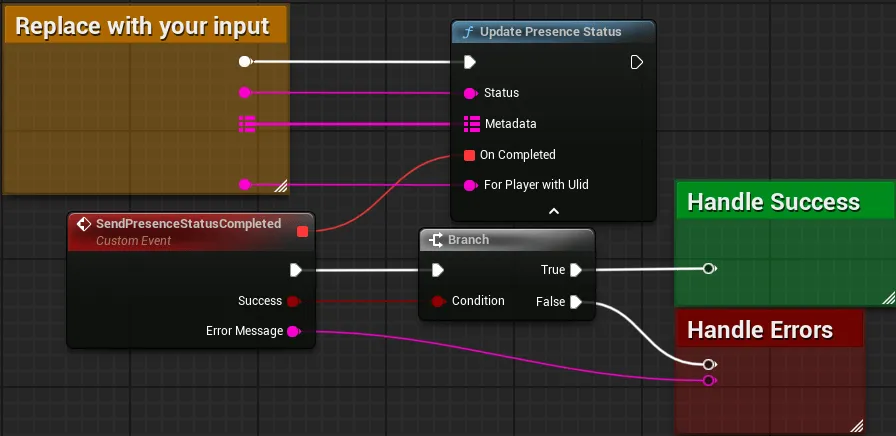
Coming soon — this sample hasn't been written yet.
Presence uses a WebSocket connection. First initialize a user session with REST using any of the authentication methods. Once authorized, open a WebSocket connection to ws://domain_key.lootlocker.com/game/presence/v1, with the first message being:
{"token": "the_signed_in_users_session_token"}You'll get back a response confirming whether you were authenticated:
{"authenticated":true}The WebSocket disconnects automatically after 1 minute of no activity. Send a ping once per minute to cover any network delays or interruptions — if the WebSocket disconnects, you'll need to reconnect.
{"type":"ping"}Response:
{"type":"pong"}To send Rich Presence statuses, send a message with the following structure:
{ "metadata": { "key1": "value1", "key2":"value2" }, "status": "game_status_to_send"}Out of Focus / Pause Behavior
When Auto Connect and Disconnect On Pause are enabled, Presence reconnects and resends the last status that was sent when Presence reconnects.
Conclusion
You've used Rich Presence to send a change of game status. To learn how to interpret this information, continue to View Presence in Web Console.